Professional speech recognition that speaks your organization's language
Speak it. See it. Shape it, by voice. Real-time text at your cursor in Word, Outlook and the apps you already use, on Windows or Mac.
$43.67/user/month · billed annually at $524.00 per user (list $599.00)
Speak it
Dictate naturally into your microphone or SpeechMike.
See it
Text appears at your cursor in real time.
Shape it
Navigate, edit and format by voice.
Review it
Check and finalize. You stay in control.
See SpeechLive Professional Direct in action
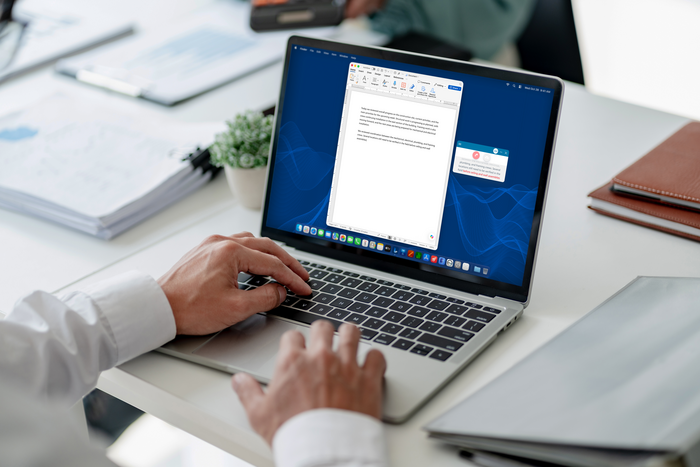
Your words appear at the cursor, in real time
Reports, emails, meeting notes and project updates. Put the cursor where you want the text and start talking. There's no separate editor and no copying and pasting.
Why professionals choose it
Speaks your organization's language
Use Vocabulary to teach it your industry terms, company and product names and technical expressions. Entries sync across your SpeechLive apps.
Consistent written output
Replacements turn spoken phrases into your house style. For example, saying "service level agreement" gives "SLA". Rules can be set per user or across the whole organization.
Familiar voice commands
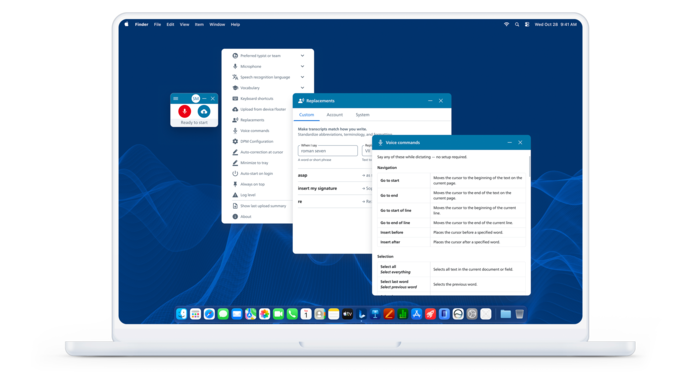
29 built-in commands to navigate, select, edit and format hands-free. Say "What can I say?" to see them all.
Punctuation your way
Automatic for natural dictation, or spoken ("comma", "full stop") for full control.
Multi-speaker recognition
Meetings and interviews transcribed with speaker labels and timestamps.
Hands-free editing, built in
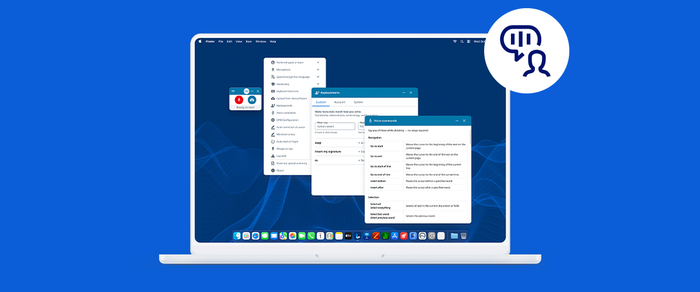
Voice commands work out of the box with nothing to set up. Microphone, recognition language, Vocabulary and Replacements are all in one simple menu.

Who it's for
Built for
- Professionals and teams in construction, finance, insurance, journalism, law enforcement, consulting and general business
- Any organization that uses its own terminology every day
Everyday use
- Business correspondence and reports
- Meeting notes and project updates
- Technical and industry-specific documents
- Internal communications
Keep the way you dictate. Change the platform underneath.
If your Dragon Professional setup is reaching end of life, SpeechLive Professional Direct keeps what your team relies on: dictation at the cursor, voice commands and custom vocabulary. It adds SpeechLive's cloud workflow for routing dictations to assistants and transcription. Before you switch, we review your applications, commands, vocabulary and hardware. Then we handle setup and training.
Book a migration review

Works with Philips SpeechMike
Use a Philips SpeechMike for the best accuracy. In the desktop app you can assign buttons for microphone on/off, press-and-hold recording, Undo and Redo.
For group meetings with Multi-speaker, use an omnidirectional microphone.
Supported models
- SpeechMike Premium LFH3500
- SpeechMike Premium SMP3700/4000
- SpeechMike Ambient PSM5000
What's included
- Philips SpeechLive cloud dictation & transcription platform
- Speech Recognition Professional: English (US), English (UK), French, German
- SpeechLive desktop app for Windows and Mac (Apple Silicon)
- 29 voice commands, Vocabulary, Replacements, automatic or spoken punctuation
- Multi-speaker recognition
- Routing to assistants and transcriptionists
- Setup and onboarding from our team

Philips SpeechLive Professional Direct
SKU PCL6001
per user / month
Billed annually at $524.00 per user (list $599.00). Save $75.00/year.
1 user: $43.67/month · $524.00 billed annually
Need 10+ users or a formal quote? Request a quote
Frequently asked questions
Does it use generative AI?+
No. Professional Direct is speech recognition: your words become text and you stay in control. AI document drafting is available separately as SpeechLive Professional AI Assistant.
Can I dictate into my existing applications?+
Yes. Text appears at the cursor in supported desktop applications through the SpeechLive desktop app.
Does it work on a Mac?+
Yes. It runs on Apple Silicon Macs and on Windows 10 and 11.
Does it work offline?+
No. Real-time recognition needs an internet connection.
Will my Dragon voice commands and vocabulary carry over?+
The most familiar commands are supported. Vocabulary is set up fresh rather than imported, and we help with that during onboarding.
Can I set up terminology for my whole company?+
Yes. Vocabulary syncs across your SpeechLive apps, and Replacement rules can apply to individual users or to the whole organization.
Can I keep my Philips hardware?+
Yes, for the SpeechMike Premium LFH3500 and SMP3700/4000 and the SpeechMike Ambient PSM5000.
Can you move us from SpeechExec or another dictation solution?+
Yes. We handle the planning, setup, migration, onboarding and training.
Is our data secure?+
SpeechLive runs on Microsoft Azure, which guarantees 99.9% uptime. Recordings are encrypted, data is hosted in your region, and access is role-based and backed up. Admins can restore deleted dictations for up to 30 days. SpeechLive is ISO 27001, ISO 9001 and ISO 14001 certified and GDPR compliant. Details: www.speechlive.com/trust

Get set up before the new year
Use the quieter holiday weeks to switch and train, rather than rushing in January.
Recognized text should be reviewed before use.